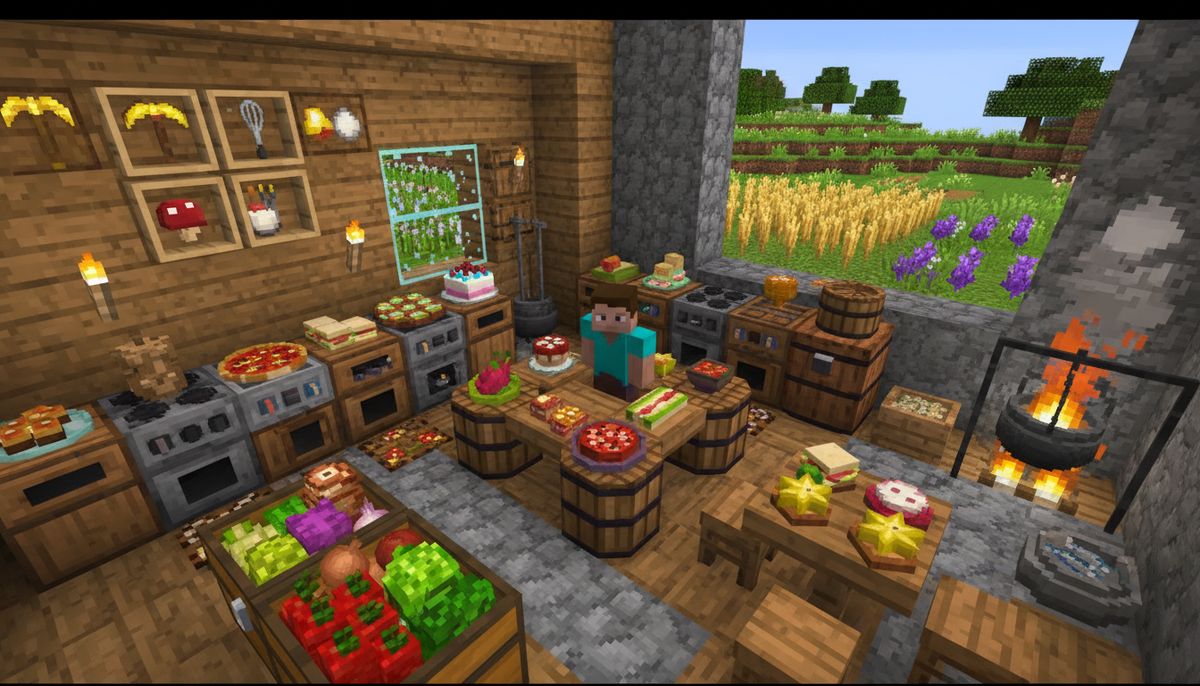
Minecraft's food system works, but it's basic. A few crops, simple mechanics, and meals that restore hunger points. That's about it. Food and cooking mods transform this shallow system into something genuinely engaging. They add farming complexity, cooking processes, kitchen equipment, preservation mechanics, and dozens of new crops and recipes. Suddenly, you're not just eating bread between mining sessions—you're managing a farm-to-table operation.
The best food addons for Minecraft Bedrock Edition don't just dump 50 new apples into your inventory. They create gameplay loops. Grow specialty crops, process ingredients with new tools, combine items into elaborate meals, and feed yourself better food for stronger effects. Some mods add refrigeration to prevent spoilage. Others introduce cooking appliances with actual multi-step recipes. A few even add restaurants, food trucks, or brewing systems that put vanilla potions to shame.
This list covers the top food and cooking addons that work reliably on Bedrock Edition. Each entry includes what it adds, how it changes gameplay, and why it earned a spot here.
Explore All Food Mods
Browse the complete collection of food, cooking, and farming addons for Bedrock Edition.
Browse Collection →Why Food Mods Matter for Bedrock Players
Vanilla Minecraft treats food as a necessity, not a feature. You eat when the hunger bar drops. That's the extent of the interaction. Food mods flip this dynamic. They make farming strategic, cooking rewarding, and meals meaningful beyond basic saturation points.
Bedrock Edition has fewer cooking addons than Java, but quality beats quantity here. The mods available focus on practical additions—new crops that fit vanilla aesthetics, appliances that make sense in a block world, recipes that feel like natural extensions of existing mechanics. You won't find absurdly complicated tech trees or ingredients that require wiki diving to understand. Most Bedrock food mods slot into survival mode without disrupting balance.
These addons pair exceptionally well with survival addons that expand farming, storage, and resource management. Combining a cooking mod with backpack storage or improved farming tools creates a cohesive survival experience where food preparation becomes a core gameplay pillar instead of an afterthought.
Farmer's Delight (Bedrock Port)
Farmer's Delight is the gold standard for cooking mods on Java Edition, and the Bedrock port delivers most of its best features. This addon introduces cooking pots, cutting boards, skillets, and over 40 new food items. It's not just variety—it's a complete overhaul of how you prepare and consume meals.
The cooking pot is the centerpiece. Place it above a heat source, add ingredients, and wait for the meal to finish. Stews, soups, and pasta dishes require multiple components: a base liquid, protein, vegetables, and sometimes garnishes. Each meal restores more hunger and saturation than vanilla foods, rewarding the extra effort. The cutting board lets you process raw ingredients—slice tomatoes, chop onions, mince meat—into components used in recipes.
Farmer's Delight adds crops like tomatoes, cabbage, rice, and onions. Each grows on farmland using familiar mechanics. No complicated fertilization systems or obscure growing conditions. Plant, water, harvest. Rice requires water blocks adjacent to farmland, mimicking real-world rice paddies. Cabbage grows in stages like wheat but yields multiple heads per plant.
The addon includes storage options: baskets for bulk ingredient storage and pantries that hold more than chests but only accept food items. These additions mesh perfectly with furniture mods if you're building a functional kitchen. The skillet cooks eggs, bacon, and mutton into breakfast foods that provide better buffs than their raw counterparts.
Compatibility is solid. Farmer's Delight works alongside most other addons without conflicts. It doesn't replace vanilla items—it supplements them. You can still eat bread and carrots, but roasted mutton with rice and gravy becomes the superior option once you've set up the infrastructure.
Simple Farming Plus
Simple Farming Plus takes the opposite approach from Farmer's Delight. No complex appliances or multi-step recipes. Just more crops, more foods, and straightforward recipes. This mod adds 30+ new crops including corn, lettuce, peppers, strawberries, grapes, and various beans. Each crop grows like vanilla wheat—plant on farmland, wait, harvest.
The addon shines in variety without overwhelming mechanics. Want to grow a vineyard? Plant grape vines on fences and wait for them to mature. Looking to expand your orchard? Add apple, orange, and lemon trees that produce fruit periodically. Corn grows tall like sugarcane, requiring vertical space but yielding multiple ears per stalk.
Food items from Simple Farming Plus combine into salads, sandwiches, juices, and baked goods. Recipes use the crafting table—no special equipment required. A salad might need lettuce, tomato, cucumber, and a bowl. A sandwich combines bread, lettuce, meat, and cheese. These meals restore more hunger than their individual ingredients, encouraging you to cook rather than eat raw crops.
The mod includes spices: salt, pepper, and various herbs grown from seeds found by breaking grass. Spices don't provide hunger points alone but enhance other recipes when added as ingredients. A roasted chicken with herbs restores more than plain roasted chicken. It's a small touch that adds depth without complexity.
Simple Farming Plus pairs well with building mods. The variety of crops creates visually distinct farms. Rows of corn next to pepper plants next to strawberry patches look better than endless wheat fields. The addon respects vanilla aesthetics—nothing here looks out of place in a standard Minecraft world.
Culinary Construct Bedrock
Culinary Construct lets you build custom sandwiches and wraps using nearly any food item in the game. It adds one block—the Sandwich Station—and a simple interface for combining ingredients. Place bread or a tortilla as the base, add up to five ingredients, and create a meal that sums the hunger and saturation values of all components.
This addon solves a common problem: leftover food clutter. Got three cooked chickens, two carrots, and a baked potato taking up inventory space? Combine them into one sandwich that restores all their hunger in a single item. The Sandwich Station accepts modded foods too, making it compatible with other cooking addons on this list.
The system includes wraps, which use paper as the base instead of bread. Wraps hold different ingredient combinations and provide slightly less saturation than sandwiches but weigh less (metaphorically—Minecraft doesn't have weight mechanics, but wraps use fewer resources to craft). You can theme your meals: make a breakfast wrap with eggs and bacon or a vegetable sandwich with every crop you're growing.
Culinary Construct doesn't add crops or complex cooking processes. It's purely a food combination tool. That focused scope makes it an excellent secondary addon. Install it alongside Farmer's Delight or Simple Farming Plus to maximize your ingredient variety, then use the Sandwich Station to create portable meals for exploration. It pairs particularly well with adventure maps where inventory space matters and efficient food storage makes the difference between survival and starvation.
Pam's HarvestCraft (Bedrock Adaptation)
Pam's HarvestCraft is legendary in the Java modding community, and several Bedrock creators have adapted its core concepts. These adaptations add 60+ crops, dozens of fruit trees, and over 100 craftable food items. The sheer scope makes this one of the most content-rich food mods available for Bedrock Edition.
Crops range from the mundane (lettuce, cucumber, corn) to the exotic (kiwi, dragonfruit, starfruit). Each crop has unique growing requirements. Most plant on farmland and follow vanilla growing mechanics, but some need specific biomes or climates. Date palms grow in deserts, cranberries need water-adjacent farmland, and coffee plants require jungle biomes. This biome specificity encourages exploration and adds strategic depth to farm planning.
The addon includes kitchen appliances: a bakeware station for pies and pastries, a cutting board for ingredient prep, a mixing bowl for combining liquids and powders, and a skillet for frying. Each appliance handles specific recipe types. Pies require dough (crafted from flour and water), a filling (fruit or meat), and the bakeware station. Juices need fruits, the mixing bowl, and bottles.
Food items in Pam's HarvestCraft stack to 64, unlike vanilla foods that stack to varying amounts. This quality-of-life improvement makes carrying large quantities of food practical. The meals themselves provide varied hunger and saturation values. A fruit salad might restore three hunger points, while a pot roast restores eight. The best meals require multiple steps and rare ingredients, rewarding players who invest in comprehensive farms.
The Bedrock adaptations of Pam's content sometimes split features into multiple addons due to file size limits. You might find one addon with the crops and another with the appliances and recipes. Check compatibility notes before installing multiple parts to avoid conflicts. When properly combined, this system rivals Java's food mod offerings in depth and variety.
Kitchen Utilities and Appliances
Several standalone addons focus on kitchen equipment rather than food items. These mods add refrigerators, stoves, microwaves, blenders, and other appliances with functional mechanics. They're ideal for players building realistic bases who want kitchens that actually work.
A typical appliances addon includes a refrigerator that functions as cold storage with double chest capacity, a stove that speeds up cooking (place raw food in the stove slots, fuel it like a furnace, retrieve cooked food faster than vanilla), and a microwave for instant reheating of previously cooked meals. Some versions add blenders that convert fruits into juices with one-click efficiency, coffee makers that produce energy drinks providing speed buffs, and dishwashers that clean used bowls and bottles automatically.
These addons emphasize aesthetics as much as function. Appliances are modeled in full 3D with textures that match modern kitchen equipment. A stainless steel refrigerator looks at home in a contemporary build. A wooden ice box fits a medieval or rustic theme. The visual variety helps you create kitchens with personality.
Functional mechanics vary by addon. Some refrigerators preserve food indefinitely, preventing spoilage in mods that introduce decay systems. Others provide no mechanical benefit beyond storage but look excellent in screenshots. Stoves might reduce cooking time by 50% or provide small XP bonuses when used. Coffee makers could grant 30 seconds of Speed I or require specific bean crops added by the same mod.
Kitchen appliances mods stack well with cooking addons. Install Farmer's Delight for recipes and cooking mechanics, then add an appliances mod for the physical kitchen setup. Your base transforms from a utilitarian survival shelter into a space where food preparation feels like an intentional activity rather than a side task done at a random crafting table.
Fast Food and Restaurant Mods
A subset of food addons focuses on fast food and restaurant experiences. These mods add burgers, pizzas, tacos, sushi, and other meals typically found in restaurants. Some include decorative blocks like restaurant booths, counters, and menu boards. Others add functional restaurants as generated structures in the world.
Fast food mods typically simplify recipes compared to farming-focused addons. A burger might just need beef, bread, lettuce, and tomato—no cutting board or skillet required. Pizza uses dough, tomato sauce, cheese, and toppings. Tacos combine tortillas, meat, lettuce, and salsa. These recipes assume you're supplementing with crop mods that provide the necessary ingredients.
The meals themselves often restore substantial hunger and provide short-duration buffs. A double cheeseburger might restore seven hunger points and grant 15 seconds of Regeneration I. A loaded pizza restores ten hunger and provides Saturation for 30 seconds. These buffs aren't powerful enough to break progression but feel rewarding after investing in the ingredients.
Restaurant structure addons generate buildings in villages or along roads. These structures include functional cooking equipment, storage, and sometimes NPC villagers offering food trades. A pizza restaurant might have a brick oven, prep stations, and a villager who trades emeralds for cooked pizzas. Finding one of these structures early game provides immediate access to advanced meals without building the infrastructure yourself.
These mods work best in multiplayer or roleplay scenarios. Setting up a functioning restaurant with friends creates interesting player-driven economies. One player farms crops, another manages cooking, a third handles customer orders. In singleplayer, they're fun thematic additions that make villages feel more alive and provide late-game projects beyond standard survival goals.
More Survival Tools and Mechanics
Expand your survival gameplay with backpacks, improved farming tools, and resource management addons.
Browse Collection →Beverage and Brewing Additions
Vanilla Minecraft's brewing system is limited to potions. Beverage mods expand drinks into a full category: juices, sodas, coffee, tea, smoothies, and alcoholic beverages. These addons add new liquid types, drinking mechanics, and effects that go beyond standard potion buffs.
Coffee and tea mods typically add new crops (coffee beans, tea leaves) grown like standard Minecraft plants. Harvest the crop, process it (sometimes requiring a drying rack or roasting station), then brew it using a special appliance or modified brewing stand. The resulting drink provides buffs: coffee grants Speed and Haste for short durations, tea provides Regeneration, energy drinks boost mining speed.
Juice mods use fruits as ingredients. A blender or juicer block processes apples, oranges, berries, or melons into bottled drinks. Mixing multiple fruits creates blended juices with combined effects. Apple-carrot juice might restore hunger and provide minor health regeneration. Berry smoothies could grant brief saturation boosts.
Some beverage addons introduce alcohol brewing with aging mechanics. Ferment grains or fruits in barrels, wait real-world time (or in-game days depending on the mod's settings), then bottle the result. Aged beverages provide stronger effects but require patience. This mechanic adds a long-term project element similar to crop breeding in vanilla Minecraft.
Drinks generally stack less efficiently than food, occupying more inventory slots per hunger point restored. This trade-off balances their additional effects. You wouldn't travel with only drinks, but carrying a few coffee bottles for mining sessions or speed boosts during exploration adds strategic depth to loadout planning.
Choosing the Right Food Mod for Your Playstyle
Not every food addon suits every player. Consider what you want from expanded food systems before installing.
For simple variety without mechanical complexity: Simple Farming Plus or fast food mods work best. They add content—crops, foods, recipes—without demanding new gameplay loops. You farm and cook using familiar mechanics but with more options.
For deep cooking mechanics: Farmer's Delight (Bedrock port) or Pam's HarvestCraft adaptations provide multi-step processes, specialized equipment, and recipes that feel like achievements when completed. These mods reward investment in infrastructure and planning.
For visual appeal in builds: Kitchen appliances mods prioritize aesthetics. They make bases look lived-in and functional. Pair these with building-focused addons for maximum effect.
For roleplay and multiplayer: Restaurant and fast food mods create player interaction opportunities. They give purpose to building public spaces and enable player-driven economies around food production.
For survival challenge: Beverage mods with aging mechanics or food mods that add preservation systems introduce long-term planning elements. You're not just feeding yourself—you're managing resources across time.
Compatibility Considerations
Most food mods for Bedrock Edition coexist peacefully because they add content rather than modifying core systems. A crop addon and an appliances addon typically don't conflict. Problems arise when multiple mods alter the same game files or add items with identical identifiers.
Before combining addons, check their descriptions for compatibility notes. Creators often test popular combinations and list known conflicts. If you're installing multiple food mods, follow this order: crop/ingredient mods first, cooking mechanics mods second, appliance/decoration mods last. This layering minimizes conflicts.
Some food addons require Experimental Gameplay toggles in world settings. Enable "Holiday Creator Features" and "Additional Modding Capabilities" before loading a world with complex cooking mods. These toggles allow addons to use custom blocks, items, and recipes that vanilla Bedrock doesn't natively support.
Storage space matters on mobile devices. Large food mods with hundreds of items and textures can slow performance on older phones or tablets. If you play on Android or iOS, prioritize smaller, focused addons over comprehensive overhauls. Check the addon file size before downloading—anything over 50MB may impact performance on low-end devices.
For additional guidance on combining addons safely, the article How to Combine Addons Safely on Bedrock covers load order, conflict resolution, and testing procedures in detail.
Practical Tips for Using Food Mods
Start small. Don't plant 30 new crop types immediately. Add two or three new plants per farming session, test their growth rates and yield, then expand. This approach prevents overwhelming yourself with ingredient management.
Organize storage by meal type. One chest for breakfast ingredients, another for lunch, a third for beverages. Label chests with signs if your appliances mod doesn't include built-in labeling. Ingredient sprawl is the biggest challenge in heavily modded food systems.
Automate where possible. If your food addon includes mechanical harvesters or auto-cooking appliances, use them. Manual farming of 40 crop types becomes tedious fast. Automation tools common in survival addons pair excellently with food mods.
Build a dedicated kitchen space. Spreading appliances across your base creates inefficiency. A centralized kitchen with appliances, storage, and crafting stations streamlines cooking. This setup also looks better in builds and makes showcasing your food mod collection easier in screenshots or videos.
Experiment with recipe combinations. Many cooking mods allow ingredient substitution. A stew recipe might accept any protein (beef, chicken, pork) or any vegetable (carrot, potato, cabbage). Testing variations helps you understand which meals provide the best hunger-to-effort ratios.
Check saturation values, not just hunger points. Saturation determines how long before you're hungry again. A meal restoring eight hunger with low saturation leaves you eating again soon. A meal restoring six hunger with high saturation keeps you fed longer. Most food mod tooltips display both values—prioritize high saturation foods for exploration.
Enhancing the Experience Further
Food mods work well with other addon categories. Pairing cooking systems with realistic texture packs creates visually stunning kitchens where every meal looks like it belongs in a cooking show. Adding furniture mods provides dining tables, chairs, and decorative elements that transform functional kitchens into centerpiece builds.
For players interested in self-sufficient survival bases, combining food addons with farming automation and storage mods from the tools category creates comprehensive systems. You're not just cooking—you're managing supply chains from seed to table.
Multiplayer servers benefit enormously from food mods. Player specialization becomes possible: dedicated farmers, chefs, ingredient traders. These roles create interdependence and emergent gameplay moments that vanilla Minecraft's simple food system can't support.
Final Recommendations
For most players, starting with Farmer's Delight (Bedrock port) provides the best balance of depth and accessibility. It overhauls cooking without overwhelming you, adds enough crops to feel meaningful, and includes appliances that enhance builds visually and functionally.
Players who prefer variety over complexity should grab Simple Farming Plus. It expands your farming options dramatically without demanding new gameplay patterns. You farm and eat like always—just with more choices.
Those building detailed bases or playing in creative mode should prioritize kitchen appliances addons. The aesthetic improvements matter more than mechanical depth in these contexts, and the visual results justify the download.
Combine these with a beverage mod for complete food system coverage. Coffee, tea, and juices add buffs that make food management strategically interesting rather than a hunger bar maintenance task.
Whatever combination you choose, food and cooking mods transform one of Minecraft's most basic systems into something worth engaging with. The difference between eating bread every five minutes and preparing a herb-crusted salmon with roasted vegetables isn't just saturation points—it's the sense that you're inhabiting a world instead of just surviving in one.