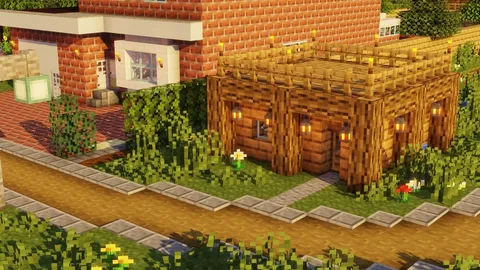
Three Styles, Three Experiences
Every Minecraft texture pack falls into one of three broad categories. Each transforms the game in a different way, and the right choice depends on your device, your playstyle, and what you want Minecraft to feel like.

Faithful: Sharper Vanilla
Faithful packs take the original Minecraft textures and enhance them at higher resolution. Blocks look exactly like you expect — just with more detail, smoother gradients, and cleaner edges.
Key characteristics:
- 32x or 64x resolution (2-4 times default)
- Vanilla color palette preserved
- Every block is recognizable instantly
- UI and items also enhanced
Pros: Universally appealing, good performance, everything stays familiar. Cons: Subtle improvement — some players want a bigger visual change.
Best for: Players who love how Minecraft looks but want it cleaner. Survival players, multiplayer, content creators showing gameplay.
Realistic: Real-World Materials
Realistic packs replace Minecraft's pixel art with high-resolution textures that mimic real materials. Stone has visible grain, wood shows bark detail, and dirt looks like actual soil.

Key characteristics:
- 128x to 512x resolution
- Photograph-based or hand-painted detail
- Muted, natural color palette
- Often paired with shaders for full effect
Pros: Stunning visuals, immersive atmosphere, screenshot-worthy. Cons: Heavy on hardware, can look odd on some blocky structures, large file sizes.
Best for: Builders, screenshot enthusiasts, PC players, anyone wanting a cinematic Minecraft. See our top realistic packs guide for specific recommendations.
Cartoon: Bold and Playful
Cartoon packs use thick outlines, bold colors, and simplified shapes to create an animated or comic-book aesthetic. Think cel-shading meets Minecraft.
Key characteristics:
- 16x or 32x resolution (lightweight)
- Bright, saturated colors
- Thick outlines around blocks and items
- Exaggerated features on mobs
Pros: Runs on any device, fun and cheerful, unique visual identity. Cons: Not realistic, can clash with serious builds, not everyone likes the style.
Best for: Younger players, casual play, whimsical builds, anyone on budget hardware.
Side-by-Side Comparison
| Feature | Faithful | Realistic | Cartoon |
|---|---|---|---|
| Resolution | 32x-64x | 128x-512x | 16x-32x |
| Performance impact | Low | High | Very low |
| File size | 10-40 MB | 100-500 MB | 5-20 MB |
| Visual change | Subtle | Dramatic | Moderate |
| Device requirement | Any modern device | High-end | Any device |
| Vanilla recognition | Very high | Low-medium | Medium |
| Shader pairing | Good | Excellent | Decent |
| Best playstyle | All-purpose | Building, exploring | Casual, creative |
When to Use Each Style
Choose Faithful when:
- You play on mobile and want a visual upgrade without FPS loss
- You switch between creative and survival regularly
- You play multiplayer and want familiar block recognition
- You want a texture pack that never feels "wrong" on any build
Choose Realistic when:
- You build detailed structures and want them to look polished
- You have a powerful device (iPad Pro, gaming PC)
- You pair textures with shaders for maximum visual impact
- You take screenshots or record videos of your builds
Choose Cartoon when:
- Your device struggles with the default game
- You want Minecraft to feel lighthearted and fun
- You build theme parks, candy worlds, or fantasy maps
- You prioritize FPS above everything else
All Texture Styles Available
Faithful, Realistic, and Cartoon packs — all free, all tested for Bedrock 1.21. Find your perfect visual style.
Browse Texture Packs →Mixing Styles
Minecraft Bedrock lets you stack resource packs, so you can technically combine styles. Place the pack you want to take priority at the top of the list.
Practical example: Use a realistic pack for terrain and building blocks, then layer a Faithful pack on top for UI and item sprites. The Faithful pack handles items (higher priority), and the realistic pack covers everything else.
Warning: Mixed styles can look inconsistent. A cartoon mob walking on realistic stone feels jarring. Test before committing.
Performance by Style
For players on low-end devices, performance matters more than visual preference. Here is how each style affects FPS on a mid-range phone:
| Style | Typical FPS Change | RAM Usage |
|---|---|---|
| Cartoon 16x | +5-10% vs vanilla | Lower than default |
| Faithful 32x | -5-10% vs vanilla | Slightly higher |
| Faithful 64x | -15-20% vs vanilla | Moderate |
| Realistic 128x | -25-35% vs vanilla | High |
| Realistic 256x | -40-50% vs vanilla | Very high |
For dedicated FPS pack recommendations, see our FPS-friendly texture packs guide.
How to Install Any Texture Pack
The installation process is identical regardless of style. Follow our complete download and installation guide for step-by-step instructions.
- Download the
.mcpackfile from our texture collection - Tap the file — Minecraft imports it automatically
- Settings > Global Resources > Activate
- Enter a world and evaluate the look
Try one pack from each style to discover your preference. All packs in our collection are free, so there is no cost to experimenting.