
Why Everyone Is Searching for Bloodbath Horror Addon Right Now
Swayle, a YouTuber known for Minecraft horror videos, has built a following exceeding 1.2 million subscribers by exploring terrifying mods and addons. His content focuses on atmospheric horror experiences that transform Minecraft's sandbox world into something genuinely unsettling. When Swayle features an addon, search traffic spikes. The Bloodbath addon is no exception.
The Bloodbath Analog Horror addon by ColourCode has accumulated over 106,000 downloads on CurseForge. August 2026 has seen a resurgence in interest as autocomplete searches for "minecraft horror mod swayle" dominate trending queries. The addon taps into the broader analog horror trend—a subgenre of horror fiction characterized by low-fidelity graphics, cryptic messages, and visual styles reminiscent of late 20th-century analog recordings.
The source material, Bloodbath Godzilla, is the primary antagonist of an indie animated analog horror project created by Apricotal Animations. The creature originated from a mutated Basilosaurus from the colonial era that, after exposure to radiation from nuclear tests, transformed into a massive and grotesque creature harboring deep hatred for humanity. This backstory adds narrative weight to the addon's horror mechanics—these are not random monsters. They have lore.
The timing matters. Horror addons for mobs have exploded in popularity throughout 2026, and Bloodbath delivers a different flavor than jump-scare-heavy alternatives. This is stalking horror. Paranoia horror. The kind that makes you afraid to turn around.
What the Bloodbath Addon Actually Adds
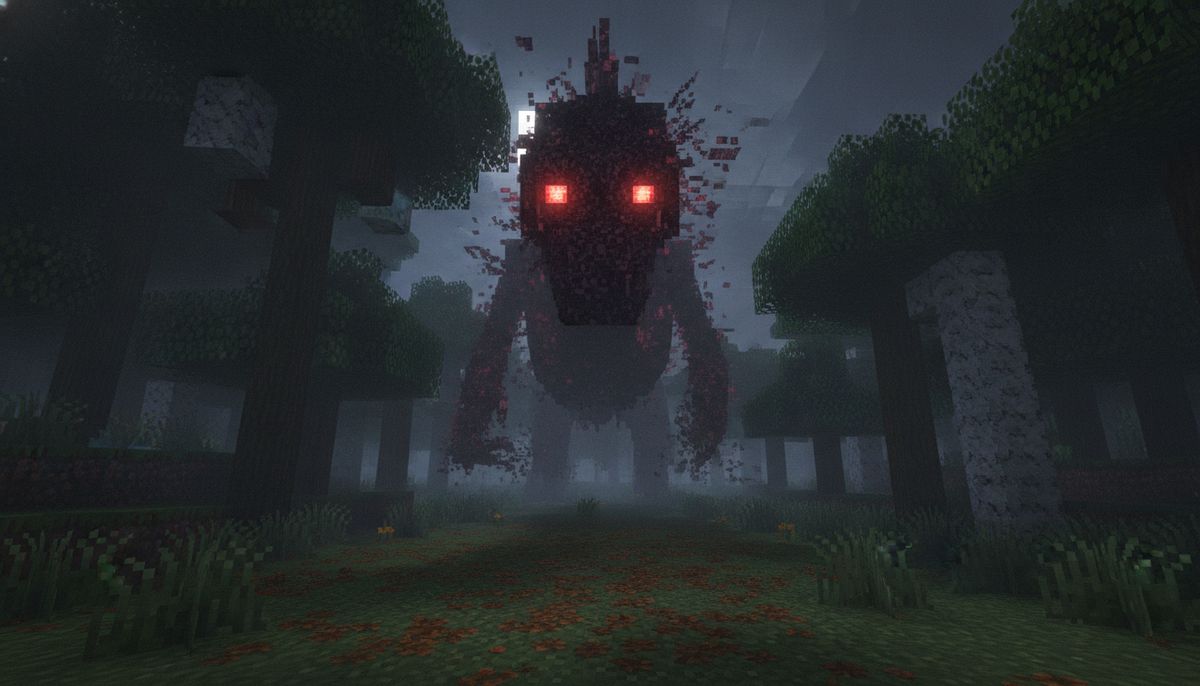
The addon adds two entities: Bloodbath, the creature from Swayle's videos, and a twisted creature with two bent horns that lurks around as a deformed entity. Bloodbath is the character that appears in Swayle's videos, while the other entity is Bloodbath Godzilla, a "man in a suit"-like figure from a horror film.
Both entities are rendered as PNG images that maintain their 2D appearance even when viewed from different angles. This design choice amplifies the uncanny feeling—they do not belong in the Minecraft world, and your brain knows it. The visual style mimics found-footage horror and old security camera recordings.
Bloodbath is a mysterious figure that hunts silently in low-light areas, and its attack applies a draining effect, forcing you to act fast. The addon does not announce itself with loud sounds or flashing lights. Instead, you might catch a glimpse of something standing at the edge of your render distance. When you look again, it is closer.
The gameplay loop mirrors the behavior patterns documented in Java Edition variants. The entity has multiple modes: idle mode where it stands still with no motion always staring at the player and disappears if the player looks at it, and approaching mode where the Bloodbath shakes as it slowly approaches the player. If the player gets too close, the Bloodbath goes into chase mode, rapidly chasing the player.
These mechanics create tension. The addon does not rely on cheap scares. It builds dread. Every shadow becomes suspicious. Every sound matters. Players report feeling watched even after closing the game.
How to Install the Addon on Bedrock Edition
The addon is compatible with Minecraft versions 1.21.30, 1.21.50, 1.21.81, 1.21.20 and newer. Installation follows the standard Bedrock addon process, but there is one critical step most players miss: An addon usually has two parts—a Behavior Pack and a Resource Pack—and both must be turned on inside your world before anything appears in-game.
Windows Installation
Double-click the .mcaddon file and Minecraft will launch and import it automatically. The file extension tells Windows to open it with Minecraft Bedrock Edition. Once imported, you will see a confirmation message.
Now create a new world or edit an existing one. Open your world, select Edit, go to Behavior Packs, tap the Available tab, select the pack, and activate it. Then do the same under Resource Packs. Both must be enabled or the entities will not spawn.
You need to enable Experimental Settings if the addon does not work. Navigate to your world settings and toggle on any experimental features the addon requires. This step is non-negotiable for many modern addons.
Android Installation
Open Minecraft's Settings, choose Storage, select Explore to open the device's file browser, navigate to the Download folder, select the downloaded file, and choose Minecraft if Android asks which app should open it.
If the file doesn't open with Minecraft automatically, try renaming it—some browsers add extra extensions like .mcpack.zip, so remove the .zip part so it ends in just .mcpack. File associations can be finicky on Android depending on your browser and file manager.
Once imported, follow the same activation process: edit your world, enable both the Behavior Pack and Resource Pack, and turn on experimental settings if prompted.
iOS Installation
Tap the downloaded file and when iOS displays the share or app-selection prompt, choose Open in Minecraft. Press "Minecraft," and the pack will automatically install into Minecraft. The file will now be imported and you'll hear a notification sound and see "Import started..." at the top of the screen.
It is recommended to use the MCPEDL app for this process, though downloading through Safari works fine for most users. If the file does not appear as an option to open in Minecraft, use the Files app to locate the download and long-press to share it to Minecraft.
Activate the packs in your world settings just as you would on other platforms. Bloodbath does not care what device you use—it will find you either way.
Is the Addon Safe and Legitimate?
Bedrock addons (.mcpack, .mcaddon, .mcworld) are data files—JSON text, images, sounds—and cannot execute code or harm your device. The risk comes from untrustworthy download sites, not the files themselves.
The Bloodbath addon is available on CurseForge with over 106,000 downloads. CurseForge is a reputable platform owned by Overwolf that hosts modding content for multiple games. Files hosted there undergo basic malware scanning.
Only download addons from trusted sources. Never install .exe or .apk files disguised as Minecraft addons. Legitimate addons are always .mcpack, .mcaddon, or .zip files. If a download link asks you to install an app or run an executable, close the page immediately.
The addon itself does not modify game files permanently. Opening the file only imports the addon into Minecraft. You can remove it at any time by deactivating the packs in your world settings. Nothing about the horror content poses a technical risk—though it might make you afraid of the dark again.
For more guidance on identifying safe downloads, see our article on Are Minecraft Mods Safe? How to Download Without Viruses.
Gameplay Tips for Surviving Bloodbath
The addon turns survival mode into survival horror. Standard Minecraft strategies do not work when an entity can phase through walls and ignore lighting rules. Here are strategies from players who have logged hours with Bloodbath enabled:
Light does not save you. Unlike most hostile mobs, Bloodbath entities spawn regardless of light levels. Torches and lanterns provide visibility but not protection. Players report encounters in fully lit bases and even underwater builds.
Do not stare. If the player looks at the Bloodbath it will disappear. This mechanic creates a dilemma: you want to keep eyes on the threat, but looking directly at it causes it to vanish and relocate. Peripheral vision becomes your best tool.
Keep moving during encounters. If the player survives for long enough, the Bloodbath will disappear. The entity operates on a timer. Distance and evasion matter more than combat. Some players build panic rooms—small, enclosed spaces with multiple exits—to break line of sight when an encounter begins.
Sound design matters. The addon includes audio cues that signal proximity. Play with headphones if you can handle it. Ambient sounds will alert you before visual contact.
Multiplayer changes the dynamic. One player can watch while another gathers resources or builds. The stalking behavior becomes more complex with multiple targets. Coordinate who keeps watch and who works.
The addon does not include a method to permanently kill or banish the entities. They are environmental hazards, not boss fights. Your goal is not to win—it is to survive long enough to accomplish your objectives before the next encounter.
Alternative Horror Addons Worth Exploring
If Bloodbath scratches an itch you did not know you had, several other horror-themed addons deliver different flavors of dread.
The Obsessed Horror Mod introduces a single-minded stalker that learns your patterns. Unlike Bloodbath's disappearing acts, The Obsessed follows predictable but relentless logic. It is less about sudden scares and more about inevitability.
Dwellers Addon populates caves with hostile entities that lurk in unlit areas. The focus shifts from surface stalking to underground paranoia. Every mining trip becomes a risk assessment.
For players who want horror without the stress, browse our full collection of fun addons. Not every horror addon aims to terrify. Some lean into campy B-movie aesthetics or comedic monster designs. Horror is a broad genre—find the version that matches your tolerance.
Horror Maps and Experiences
Combine Bloodbath with custom maps designed for horror gameplay. Abandoned buildings, dark forests, and asylum-themed worlds amplify the addon's tension.
Browse Horror Maps →System Requirements and Performance Notes
One addon file works on every Bedrock platform: iOS, Android, Windows, Xbox, PlayStation, Switch. The Bloodbath addon consists of lightweight PNG textures and basic entity behavior scripts. Performance impact is minimal even on older devices.
Android devices with 2GB of RAM or more handle the addon without lag. iOS devices from iPhone 7 onward run it smoothly. Windows 10 PCs with integrated graphics can manage the addon alongside a moderate render distance.
The addon does not conflict with most other mods. You can run it alongside texture packs, weapons addons, and quality-of-life improvements without issues. Conflicts typically arise only when multiple addons modify the same entity behavior files.
For multiplayer servers, the host must have the addon installed and activated. Most addons work in multiplayer—the host needs to have the addon installed and activated in the world. Clients joining the server will download the resource pack automatically but do not need to manually install the addon file.
If you experience frame drops, reduce your render distance before disabling the addon. The entities use line-of-sight checks that scale with render distance. Lowering from 20 chunks to 12 chunks can double performance on mid-range hardware.
Combining Bloodbath with Other Mods
The analog horror aesthetic works best when the game world feels slightly off. Pair Bloodbath with mods that enhance atmosphere without overwhelming the horror elements.
Add weather and climate addons to introduce fog, rain, and lightning. Limited visibility amplifies the stalking mechanics. A sudden thunderstorm during a Bloodbath encounter becomes an event.
Install realistic texture packs to ground the world in a less cartoonish style. The contrast between realistic environments and the PNG entities makes the horror feel more invasive. The entities do not blend—they intrude.
Avoid heavy combat mods. Weapons addons with machine guns and explosives undermine the vulnerability that makes horror work. If you can one-shot the threat, it stops being scary. Keep firepower limited to bows, crossbows, and melee weapons.
Consider adventure maps designed for singleplayer or co-op exploration. Custom-built structures with limited lighting and narrow corridors turn Bloodbath into a proper horror campaign. Maps with objectives force you to explore rather than hide in a safe base.
For guidance on avoiding conflicts between addons, see How to Combine Addons Safely on Bedrock. Load order matters less for Bedrock than Java, but resource pack priority can affect visual elements.
Community Reception and Controversy
Swayle is a YouTuber known for his Minecraft horror videos who created his channel on August 2, 2023. His rapid growth to over 1.2 million subscribers has not been without criticism. Some creators have accused him of not crediting original mod developers prominently enough in his videos. Others argue his content introduces younger audiences to horror addons without adequate warnings.
The Bloodbath addon itself faces no such controversy. ColourCode's port of the addon to Bedrock has been well-received by the community. Players praise the faithful recreation of the analog horror aesthetic and the addon's performance optimization for mobile devices.
The original Bloodbath Godzilla mod by Apricotal on YouTube adds the creature to Java Edition as a fully animated 3D model. The Bedrock port uses PNG sprites instead due to platform limitations, but this compromise actually enhances the horror. The flatness of the entities makes them feel like glitches in reality rather than natural creatures.
Comments on the CurseForge page report mixed experiences. Some players find the addon too stressful for extended play sessions. Others wish for more entity variants or configurable spawn rates. The lack of a config file means you cannot adjust difficulty—it is all or nothing.
For context on how Bedrock modding differs from Java, read Minecraft Mods vs Addons — What's the Difference?. The technical constraints of Bedrock actually benefit horror content by forcing minimalism.
Final Verdict and Download Recommendations
The Bloodbath analog horror addon delivers atmospheric horror for Minecraft Bedrock. It transforms familiar survival gameplay into a tense experience where resource gathering and building take a backseat to paranoia and evasion. The addon is not for everyone. Players who prefer action-oriented gameplay or lighthearted sandbox creativity will find it frustrating.
With over 106,000 downloads on CurseForge, the addon has proven its appeal to a dedicated audience. The August 2026 search spike suggests renewed interest, possibly driven by new Swayle videos or emerging analog horror trends on social media.
The addon works as advertised. Installation is straightforward once you remember to enable both behavior and resource packs. Performance is solid across platforms. The horror mechanics are effective without relying on cheap tricks.
Recommended for players who enjoy psychological horror, analog aesthetics, and survival challenges that prioritize tension over combat. Not recommended for young children or players sensitive to stalking-style horror.
More Horror Content for Bedrock
Explore dozens of horror-themed addons, maps, and texture packs. From jumpscare compilations to slow-burn atmospheric experiences, find the terror that fits your playstyle.
Browse Horror Collection →For comprehensive installation guidance across all devices, see How to Download and Install Minecraft Mods on Bedrock Edition (2026). The process applies to Bloodbath and any other .mcaddon file you encounter.