
Why Plenty of Blocks is Blowing Up Right Now
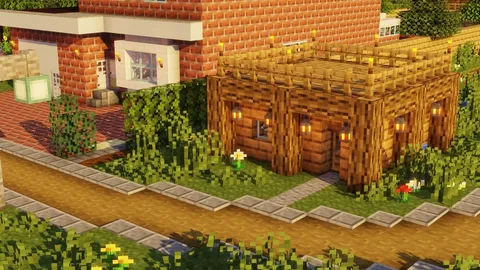
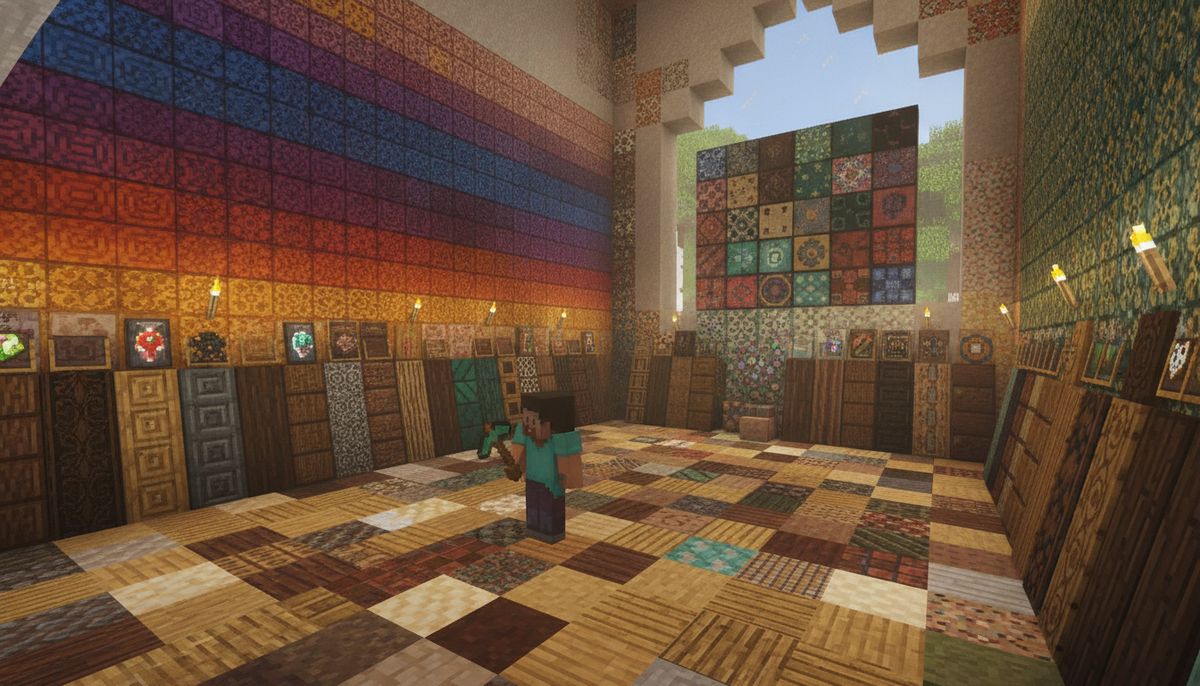
Builders searching for more creative control in Minecraft Bedrock Edition have made Plenty of Blocks one of the most-discussed addons of 2026. The mod adds something players have been requesting for years: over 1000 vanilla-style blocks and their functional stair and slab variants. Social media feeds and YouTube recommendations are currently packed with build showcases using this addon, driving searches to record highs.
What makes this surge interesting is timing. Version 1.3.5 updated for The Garden Awakens, Minecraft's latest major content drop. Players diving into fresh worlds want more building variety immediately, and this addon delivers without breaking immersion. The vanilla-style aesthetic means these thousand-plus blocks feel like they belong in the base game.
The addon sits at a 4.8-star rating on the official Marketplace with over 2,548 reviews. That rating, combined with word-of-mouth from content creators, has pushed it into trending territory across TikTok, YouTube, and search engines simultaneously. Builders tired of working within vanilla block limitations are finding exactly what they need.
What This Building Mod Actually Adds
Plenty of Blocks is created by Owls Cubed for the Minecraft Marketplace. The core promise is simple but powerful: take nearly every block type in Minecraft and give it stair, slab, and wallpaper variants. The execution is what impresses.
Slabs can be placed vertically, solving one of Bedrock's most frustrating building limitations. Vertical slabs open up wall detailing, trim work, and architectural features that were previously impossible or required awkward workarounds. The 20 vertical slab types give you precision control over surfaces that used to eat up full block space.
Wallpaper blocks transform interior design. Instead of flat walls, you can add texture and depth to rooms with decorative blocks specifically designed for this purpose. The addon includes lots of wallpapers for your rooms, letting you differentiate spaces without massive builds or resource-heavy designs.
Performance matters in large builds. These are real blocks with no entities and no lag. Many Bedrock addons use invisible armor stands or other entities to fake new blocks, causing performance hits in creative mode or on slower devices. Plenty of Blocks avoids this entirely by implementing proper block variants that behave like vanilla content.
Crafting stays accessible. The blocks break with appropriate tools, matching vanilla mechanics. You can craft variants through normal crafting tables or stonecutters, keeping the survival experience intact. No custom crafting stations or complicated recipes—just straightforward building block access.
Marketplace vs Community Versions: What You Need to Know
Plenty of Blocks is available on the Minecraft Bedrock Marketplace for 830 Minecoins, which translates to approximately $4 USD. The official Marketplace version guarantees compatibility with achievements, multiplayer servers, and future Minecraft updates. The addon has been available since November 26, 2024, and is compatible with Minecraft Bedrock version 1.16.0 and newer.
The paid version receives regular updates directly through your game client. The addon was last updated on April 26, 2026, showing active maintenance from the creator. When Minecraft adds new blocks or changes game mechanics, Marketplace purchases typically get compatibility updates without additional downloads or manual installation.
Community modding sites host free alternatives and similar building addons. These versions may offer different feature sets or block collections but won't carry the official Marketplace stamp. Free alternatives can work well, but they require manual installation and may not receive updates as consistently. Check our guide on how to download and install Minecraft mods on Bedrock Edition for installation instructions.
The official version supports 12 platforms including Amazon Appstore, Android, iOS, Nintendo Switch, Windows 10, and Xbox One. This cross-platform compatibility makes it ideal for players who switch between devices or want to use the same addon on their phone and console.
| Version | Price | Installation | Updates | Achievement Support |
|---|---|---|---|---|
| Marketplace Official | 830 Minecoins (~$4) | Automatic | Regular | Yes |
| Community Alternatives | Free | Manual | Varies | Often No |
How to Install Plenty of Blocks on Your Device
Installation through the official Marketplace is straightforward across all platforms. Launch Minecraft Bedrock Edition and navigate to the Marketplace tab from the main menu. Search for "Plenty of Blocks" in the search bar or browse the Building category. Select the addon, confirm the 830 Minecoin purchase, and the content downloads automatically to your game.
On Android and iOS devices, open the Marketplace directly from the Minecraft app. The purchase syncs to your Microsoft account, making the addon available on any device where you're logged in. Mobile players should ensure they have adequate storage space—building addons with thousands of blocks can require significant space for textures and data files.
Windows 10 and 11 users follow the same in-game Marketplace process. The addon installs to your Minecraft game directory automatically. Console players on Xbox or Nintendo Switch access the Marketplace through their controller interface with the same search and purchase flow.
After purchase, create a new world or modify an existing one. In the world creation or edit screen, scroll to the "Resource Packs" and "Behavior Packs" sections. Plenty of Blocks should appear in your available addons list. Activate both the resource pack and behavior pack for full functionality. Some features require experimental gameplay toggles—the game will prompt you if needed.
For multiplayer worlds or Realms, the world host must own the addon. All players joining can use the blocks without owning the content themselves, but only the host can place them initially. This makes it practical for friend groups where one person owns Marketplace content.
If you're exploring free alternatives from community sites, you'll need to manually import .mcaddon or .mcpack files. Our detailed guide on Minecraft Bedrock addons covers manual installation, file management, and troubleshooting common issues.
Best Building Mods for Minecraft Bedrock
Expand your creative toolkit with curated building addons covering blocks, furniture, decorations, and architectural tools for Bedrock Edition.
Browse Building Mods →Is This Addon Safe and Legit?
Marketplace content undergoes Mojang's official review process before publication. This means Plenty of Blocks meets Microsoft's technical and content standards for Minecraft Bedrock Edition. The official version can't contain malware, stolen content, or code that breaks your game installation.
The Marketplace version is safe to use with achievements enabled. Many community addons disable achievements to prevent exploits, but official Marketplace content preserves the vanilla achievement system. You can build elaborate structures with these thousand blocks while still earning achievements for your survival progress.
Owls Cubed is the verified creator listed on the Marketplace, with a track record of maintained content. The creator's profile shows other published works and community engagement, indicators of legitimate content development. Marketplace creators have financial incentive to maintain their addons and provide support.
Free community versions carry different risk profiles. Reputable modding platforms like MCPEDL, CurseForge, or ModBay screen uploads, but they don't provide the same guarantee as official Marketplace content. Always verify the source before downloading free addons. Our article on whether Minecraft mods are safe breaks down how to evaluate addon sources and avoid malicious files.
The 4.8-star rating from thousands of users provides social proof of quality. Browse the Marketplace reviews to see how the addon performs on different devices and in various world types. Players consistently praise the performance optimization and vanilla-compatible design in their feedback.
Building Tips and Creative Applications
Vertical slabs transform wall construction. Use them to create recessed lighting, wall trim, or column details that add depth without consuming full block space. Mixing vertical and horizontal slabs lets you build window frames, door surrounds, and architectural molding that looks far more detailed than vanilla blocks allow.
Interior designers benefit most from the wallpaper blocks. Create accent walls, wainscoting, or patterned surfaces that differentiate rooms without relying on paintings or item frames. Combining different wallpaper textures with strategic lighting creates sophisticated interior spaces that rival modern build showcases.
The stair variants for every block type eliminate compromises. You no longer need to skip stairs on unusual block types or settle for wood stairs in a concrete build. Matching stairs and slabs for copper, stone variants, or specialized blocks maintain visual cohesion across large projects.
Color-matched builds become simpler with comprehensive variant coverage. If you're building with prismarine, you get prismarine stairs, slabs, and vertical slabs. No more switching to different materials mid-build because variants don't exist. This consistency is especially valuable for themed builds where maintaining a single material throughout is crucial.
Survival players can craft all variants, making the addon practical beyond creative mode. The blocks use normal crafting recipes and break with appropriate tools, integrating into survival progression naturally. You're not locked out of advanced building techniques just because you're not in creative mode.
Try experimenting with vertical slab combinations. Placing different vertical slabs adjacent creates custom patterns and textures that don't exist in vanilla Minecraft. This technique works well for floors, ceilings, or decorative walls where you want visual interest without busy patterns.
If you're interested in expanding your building options further, check out our collection of furniture mods for Bedrock to complement your new block palette with functional interior items.
Alternatives and Similar Building Addons
Players looking for different building block collections have several options. The Faithful texture pack approach extends vanilla blocks without adding new ones—if you want familiar blocks with updated textures, that route offers a different building enhancement. Our comparison of Faithful vs Realistic vs Cartoon textures explores texture-based building improvements.
Medieval builders should consider specialized medieval addons that focus on castle blocks, timber framing, and period-appropriate materials. These addons often include fewer total blocks than Plenty of Blocks but provide deeper coverage of specific historical building styles.
Modern architecture fans might prefer modern city addons that emphasize contemporary materials like glass varieties, concrete patterns, and industrial blocks. These addons cater to urban builders and players creating futuristic environments.
The Vanilla Variants or Chisel addons offer similar "more variants of existing blocks" approaches with different implementation styles. Some focus on decorative blocks exclusively, while others emphasize functional building blocks like stairs and slabs. Comparing feature lists helps identify which addon matches your building priorities.
Combining addons can work but requires testing. Our guide on how to combine addons safely covers load order, conflict resolution, and which addon types play well together. Building addons often work alongside furniture, weapon, or mob mods without issues since they modify different game systems.
For builders wanting total conversion experiences, Bedrock modpacks bundle multiple compatible addons into themed collections. These curated sets ensure the included addons work together and provide cohesive gameplay enhancements across multiple categories.
Players interested in functional rather than decorative blocks might explore tools mods, redstone automation addons, or farming addons that change gameplay mechanics alongside building options.
Why This Addon Works for Every Building Style
The vanilla-style aesthetic is the secret to Plenty of Blocks' versatility. The blocks don't impose a specific theme or force you into particular building styles. Whether you're constructing medieval castles, modern skyscrapers, fantasy structures, or survival bases, the blocks integrate seamlessly because they extend rather than replace vanilla content.
Survival players benefit from the practical, lag-free implementation. You can use these blocks on multiplayer servers, Realms, or your phone without worrying about performance drops or compatibility issues. The survival-friendly crafting system means you progress through material tiers naturally, unlocking fancier variants as you gather better resources.
Creative mode builders gain access to a palette that finally matches their ambitions. The thousand-plus block variants mean fewer compromises and more time actually building instead of working around material limitations. Vertical slabs alone justify the addon for many builders—they're a feature players have requested for years.
The active development and update support matter for long-term projects. Worlds built with Marketplace addons don't break when Minecraft updates. The creator maintains compatibility with new versions, so your builds remain functional across Minecraft's evolution. That stability is crucial for builders investing dozens or hundreds of hours into large projects.
At 830 Minecoins, the addon costs less than most Marketplace skins but provides significantly more gameplay value. For builders who spend serious time constructing rather than adventuring, this addon delivers hundreds of hours of enhanced building capability. The cost-per-hour ratio easily beats most Minecraft purchases for the construction-focused player.
Whether you're a casual builder making your survival base prettier or a creative mode architect crafting massive builds for YouTube, Plenty of Blocks removes the artificial limitations that have frustrated Bedrock builders since day one. The trending searches reflect what happens when an addon solves a genuine pain point while maintaining the vanilla feel players love.